
It’s been quiet on the multicore parallelization front for a while. We looked at one example a couple times several years ago: Vector Fabrics*. We looked at the overall problem of extracting parallelism and then some advances in Vector Fabrics’ tools at the time. I include those links here because they go into some detail on the nature of many of the challenges – details I won’t repeat here.
But Vector Fabrics went out of business after they finally ran out of runway. Following a couple quiet years, I had a conversation at ARM TechCon with a company called Silexica doing surprisingly familiar things.
Silexica is on a path similar to Vector Fabrics. Whether they have better timing (it’s never good to be too early) or implementation focus or connections to the folks that need this, they’re plowing a familiar field. They’re leveraging the increasing availability of multicore platforms – and not just clusters of identical cores managed by the operating system (OS) (that’s the easy one – symmetric multi-processing, or SMP). They can also handle heterogeneous systems combining different CPUs and DSPs and even FPGA accelerators. There may be some SMP clusters in there, but other cores might have their own OS running (asymmetric multi-processing, or AMP), and some may be “bare-metal,” running no (or a very thin) OS.
We’ve noted before that, while identifying parallelism may have been the hard part of this technology to start with, it’s only the start. Implementing parallelism, however you come up with the strategy you want, can still be a lot of work, making productivity an important part of the value of any tools.
That said, taking an erstwhile sequential program and splitting it out to run optimally, with different pieces on different cores or even on different types of cores, is also a hard problem. And then implementing that partition, with the appropriate code bits for threading or run-to-completion or whatever – is a tedious problem.
To deal with this, Silexica’s tool suite has three major components: a parallelizer, a mapper, and a code generator. In addition, there’s a design-space exploration tool. Each solves either a hard or a tedious problem.
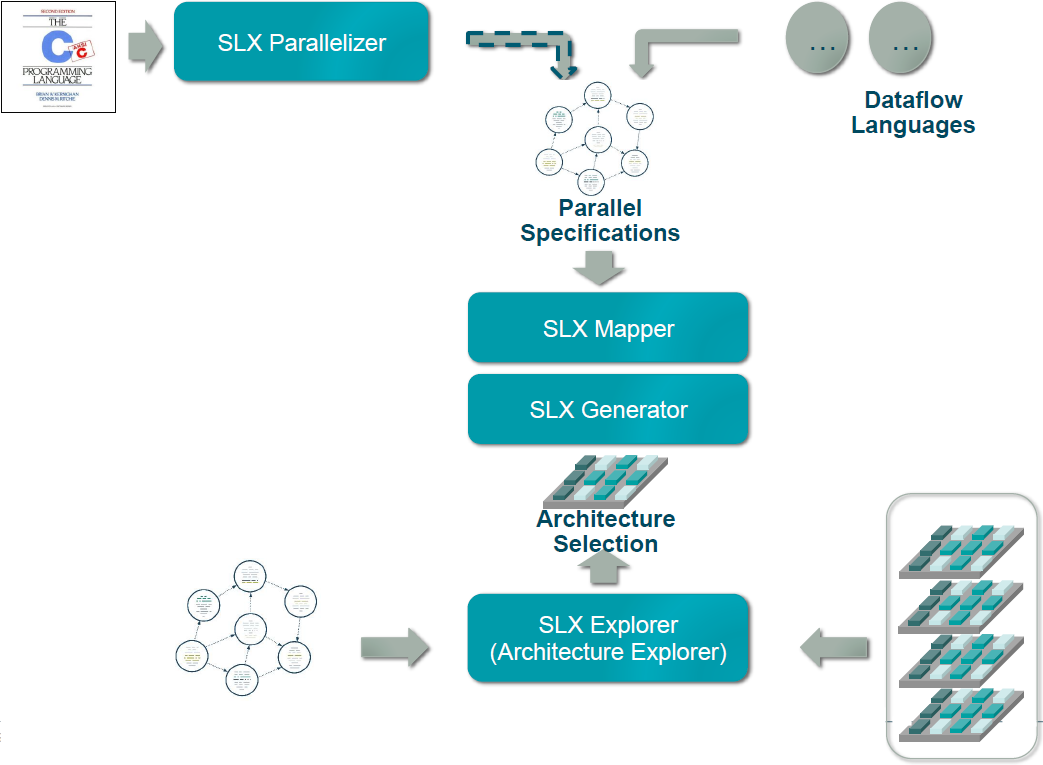
(Image courtesy Silexica)
Parallelizing
This is the original hard problem. And it’s a high-level, abstract one that has nothing to do with what multicore platform you’re using or how many threads you can run at once. It’s specific to the algorithm and nothing else. It does assume that you have a sequential (or serial) implementation of the algorithm. That may be because you’ve got production code that has historically run on a single core, or it could be because it was simply easier for an algorithm architect to think about it that way. Either way, it forms the starting point of the process.
It’s all about algorithms and data flow. In computing a particular result, there may be intermediate results that are calculated before the final one. That very nature is what mandates sequential code – code that must be executed in a particular order. If you try to parallelize it, you can get wrong results – perhaps because you calculated the intermediate result after the final one, meaning that you jumped on the final result too fast. There are mind-numbing variations on this theme.
I won’t go back into description of the various kinds of data dependencies that can thwart a parallel implementation; I’ll refer you back to those original two articles mentioned at the top of this one. While parts of the older discussion refer specifically to another company’s tools, it’s the overall ideas that matter.
On the other hand, there may be loads of things that happen in sequence in a program, but don’t need to. They do so only because, in a sequential paradigm, everything has to go before or after something else, whether or not that ordering matters in the calculated result. Understanding where order can and cannot be broken is the key to identifying how you can pull the program apart and still have it work correctly.
In fact, it’s so dataflow-driven that you don’t necessarily need a C program as your starting point. Silexica lets you use other dataflow languages, since the only thing you really need is an understanding of how data moves through the algorithm. Sounds simple, but once you start using complicated loop iterations, for example, identifying dependencies can be maddeningly difficult.
And so that’s what SLX Parallelizer does. It identifies where you can break the code order to run some parts on one core concurrently with other parts running on a different core. At this point, what core you might target isn’t a consideration. All in good time…
From a practical standpoint, what you will see if you start with a C program is a series of annotations in that program that show you where your parallelization opportunities are. Silexica runs their tools in an Eclipse environment, and they’ve customized it so that you can easily see the highlighted annotations. It will also show you an estimate of the potential gains you might see – in the abstract, anyway, since, at this point, it has no knowledge of specific cores and OSes.
The Parallel Spec
Just because you can split things up umpteen ways doesn’t mean you necessarily want to. And yes, you can have a very large number of parallel instances of code running concurrently – even in the thousands. That doesn’t necessarily mean you’re going to need to wade through each of those one by one – many will come through the breaking up of loops, where one change can create many separate parallel tasks.
As you view the opportunities, you may see some that simply aren’t worth implementing. After all, there may be overhead involved in the OS calls required for threading. If nothing else, there is some work required to do this, so you are likely to want to focus on those areas that provide the best possible return on the work.
So the job at this point is to create the parallel spec, and that’s a manual job. It involves taking the sections of code that will run independently and segregating them into separate code units. If you think you’re going to come back and maybe try a few different ways, then you probably want to leave your original sequential program intact, copying code out rather than cutting and pasting it out.
In order to help with some of the tedium later on, this is also when you can define some threading abstractions. Managing threads requires code – potentially multiple lines of code. And exactly what that code is will depend on how you want to manage things.
If you’re running a task under an OS, then there will be calls to the OS to manage the threads. But there are at least two ways of handling this, depending on the number of threads being created and the cost of creating and destroying threads. You can literally create and kill threads in real time as you need them and as you finish with them. Alternatively, if you don’t like that overhead, and if you have a large number of threads to manage, you can start your program by creating a pool of unallocated “worker threads.”
If you choose the latter approach, then when you need a thread, you won’t create one; instead, you’ll assign a task to an existing thread in the unallocated pool and run it. The real-time cost for that operation is less than that required for creating a thread anew. Likewise, when you’re done with the thread, you don’t destroy it; you retire it back into the pool.
These decisions aren’t made automatically by the tool; they’re made by the user as part of the overall strategy. And they influence what those little code bits will look like in each thread. So that’s why defining the code bits and abstracting them with a function name is also a manual job. We’ll come back to these code bits later.
Mapping
So far we’ve been dealing with the program or algorithm in the abstract, absent an actual computing platform. The effect that parallelization will have on real-world performance will depend on the platform you choose. (If you don’t know what platform to choose, well, that’s a different problem – and we’ll return to it.)
Let’s say you’ve got a board that has, oh, four identical cores with shared memory that can be managed as SMP, a smaller core running bare metal, and a DSP. And let’s say you’ve got a thousand threads to allocate to those cores. What’s the best allocation to use?
Good luck figuring that out manually! Before launching in, however, you also need to decide what your primary performance goal is. Is it throughput? Sometimes, by increasing the length of a pipeline, you can pump data through faster – at the expense of the amount of time it takes for a specific piece of data to make its way through – the latency. If latency is more important, you might use a different strategy.
This is the job of the mapper, and there are a few different strategies that you can set in order for the mapper to give you the result you want.
The information about the platform comes, essentially, from the board support package (BSP). That said, it may not be a part of the traditional BSP that your board vendor might provide, since this is a newer requirement.
The description that SLX Mapper needs is an XML file that describes the processor architecture as well as which OSes are used and how they’re instantiated. Both of those considerations affect real-world performance. Silexica has some such platforms already covered; users can also create their own.
Data communication also matters, and there are different strategies available, depending on the relationship between the cores running interdependent tasks. Do they share memory? Should they use mailboxes or semaphores? Is MCAPI implemented in the system? Imagine the many different possible cases of data communication, and you’re likely to conclude that this would be daunting to do by hand.
So the mapper takes the XML file and the parallel spec and figures out not only the best way to run the different tasks, but also the best way to communicate data. Any of those decisions can be overridden if you want, or you can simply go with what the mapper recommends.
What you get is a more realistic estimate of what real performance will look like. In the abstract, it might look like you can gain some performance by parallelizing a couple of tasks – and yet you might find, for example, that the overhead in thread management kills the performance gain. Because the mapper knows the speed of the cores and the cost of various OS operations, it can simulate their effects more accurately. So you may iterate here by playing with the parallel spec to get a better result.
Exploring platforms
Let’s come back to the scenario where you haven’t picked a platform yet – and you want to pick one that will make your algorithm shine. If you’re an architect trying to decide where your code should run, then you have another hard problem: figuring out which cores and OSes to use and how to connect them. Do you want only CPUs? All the same or different? Might a DSP help? How about a hardware accelerator in an FPGA?
SLX Explorer helps with this part of the job. It’s not going to magically invent a platform for you; you need to give it a number of alternatives; you populate the design space. The tool then goes through and shows you results based either on actual code or on rough timing annotations (if the completed code isn’t ready yet). Based on those results, you can pick a platform and move forward.
The Grunge Work: Implementation
After all of that work above, you’ve zeroed in on exactly how you want to fracture the original program, and you know what’s going to run on which core, and you know what results you should get by doing so. Only one little problem left: you haven’t yet written all the tedious code necessary to implement that parallelization. This is the domain of SLX Generator.
There are two important bits of code needed here: thread management and data communication. The latter can be done automatically, based on the communication strategies identified in the mapping operation. Each time data is sent or received by a task, the code required to make that happen is created by SLX Generator.
Threads or other means of parallel execution, on the other hand, are implemented manually, as we’ve seen. But there’s still some tedium that can be avoided by using the generator.
If you’re using threads, then you need the instructions that either create (and later destroy) the threads or allocate an existing thread (and later retire it). On the other hand, if you’re using an FPGA for hardware acceleration, you may need to copy the data into a buffer; there are DMA instructions and such needed before you can launch the accelerator.
These code bits are the ones I referred to above, when creating the parallel spec. The snippets will need to show up in all tasks; if done manually, it’s at best tedious and at worst error-prone. By identifying function-like entities early on, you can manually annotate code with the function calls.
But I should be careful to point out that these aren’t really functions in the classical sense. In fact, they’re more like macros. Which got me thinking: since we’re dealing with the C language here, why not simply define a macro in a header and then just reference the macro?
That’s actually doable in some cases, but not in all cases. Silexica points out that it would be hard to handle the FPGA launch code that way, for example. So they have a similar capability that goes beyond what the C pre-processor can do. By abstracting a bit higher, they can handle more scenarios – as well as move beyond C if they want to.
The net result is that, as a coder, you would put your “function” or “macro” call each place where needed, and SLX Generator would then swap in the lines of code that you associated with that call.
So that’s our whirlwind tour of the Silexica tools and methodology. Is the timing now right for this? Have they found just the right formula for attracting users? That remains to be proven. It’s something we’ll keep an eye on.
*Full disclosure: I worked with Vector Fabrics at one point, long before covering them.
More info:


Leave a Reply
You must be logged in to post a comment.