In my previous column, I commenced the task of cogitating and ruminating on what I might do to put food on the table if I inadvertently wandered into a timeslip and found myself transported back to the late 1930s or early 1940s. Just to increase the fun and frivolity, I pondered the possibility that this slippery timeslip also transported me into a parallel dimension in which computer science remained rooted in the analog domain.
One of the things I flatter myself I would be good at would be designing a digital computer from the ground up (the alternative of supporting myself based on my skills as an interpretative dancer really would not be a great option).
As you may recall, the process we determined to follow was to decide on an instruction set architecture (ISA) for our central processing unit (CPU), select an implementation technology (relays, vacuum tubes…), and build the hardware portions of the beast, including components like read-only memory (ROM), random-access memory (RAM), and devices like perforated paper product writers, readers, and media in the form of Teletype terminals and paper tapes or punched cards.
The next step on which we would have to focus our attention would be how to program our bodacious beauty. At its core, any digital computer understands only its own machine code; that is, the binary patterns of 0s and 1s that represent its core instructions and any associated data.
Our first option (the one adopted by people in our own slice of the multiverse) would be to capture our programs in machine code using pencil and paper. Assuming a 16-bit address bus and an 8-bit data bus, for example, such a program might look a bit like the following:
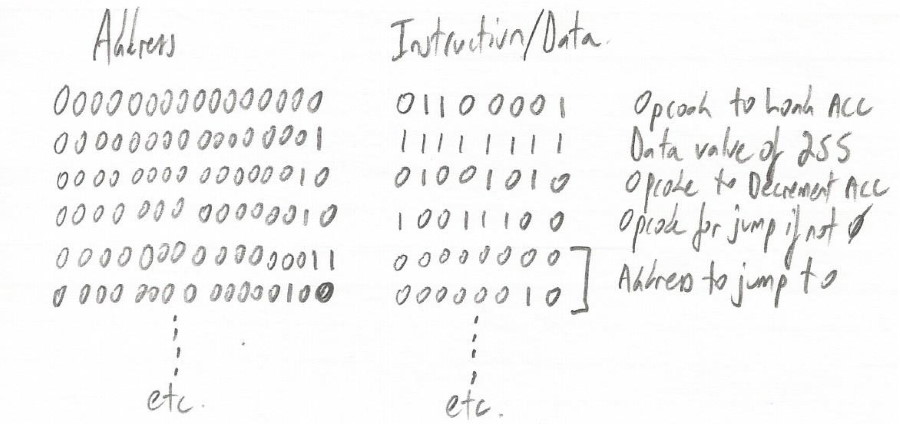
Machine code program captured using pencil and paper
(Image source: Max Maxfield)
We could subsequently input this machine code program into our computer’s memory using two banks of trusty toggle switches: one to specify the address and the other to define the opcodes (instructions) and operands (additional data or address values associated with the instructions).
In addition to being time-consuming and prone to effort, capturing programs in machine code is not as much fun as I make it sound, especially when you consider that the act of editing the program to insert or delete an instruction would change the addresses of everything that came after it.
Thus, our next step would be to conceive and document some form of symbolic representation that would be easier for humans to write, read, and understand. In addition to having mnemonics to represent each of the instructions supported by our CPU (e.g., LDA = “Load Accumulator,” DECA = “Decrement Accumulator,” JNZ = “Jump if Not Zero”), such a language would also support things like constants, comments, symbolic labels, assembly directives, and suchlike.
Returning to the way things actually happened in our world, since programs captured in this symbolic form eventually need to be “assembled” into their machine code counterparts, the symbolic form came to be called “assembly” language, while the act of translating these programs into machine code came to be called “assembling.”
Initially, we would capture our assembly code programs using pencil and paper. An example program might look something like the following:
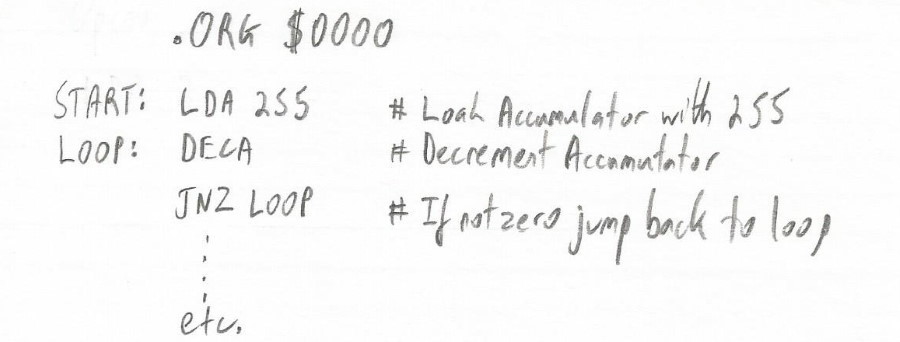
Assembly code program captured using pencil and paper
(Image source: Max Maxfield)
The great advantage of assembly language over machine code is that we (humans) can actually read and understand it. At first, however, we would still have to assemble the program (i.e., convert it into executable machine code) by hand. Once again, we would do this using pencil and paper. And, once again, once we had hand-assembled our program, we would still have to enter it into our computer using our banks of toggle switches.
As we also discussed in my previous column, in addition to defining our version of the ASCII code (the binary patterns of 0s and 1s used to represent alphanumeric characters, punctuation characters, and control codes), our next step would probably be to use our hand coding and assembly process to create some simple utility programs to perform tasks like reading and writing paper tapes and/or punched cards.
We would also use our hand coding and assembly process to create a simple text editor and a simple assembler, where the latter is a program that can read an assembly source file and assemble it into machine code for us. At this point, we would almost certainly start to loop around using our simple text editor to capture the assembly source code for a more sophisticated assembler, and then use our current assembler to assemble the more sophisticated assembler. At the same time, we would probably use our current text editor to capture the assembly source code for a more sophisticated editor, and then use our latest and greatest assembler to assemble the more sophisticated editor.
On the one hand, this process is pretty mindboggling, but it also has a certain elegant simplicity about it (I’m also reminded of the old programmer’s joke: “In order to understand recursion, one must first understand recursion”).
One of the problems with an assembly language is that it is tied to its computer’s core instruction set, which means each machine has its own language. In turn, this means that (if we exclude the concept of cross assemblers from our discussion), it isn’t possible to write an assembly language program for one computer and then assemble it for use on another computer.
Another problem with assembly languages is that, although an expert user can craft concise and efficient code, this typically takes a lot of time, which means users typically do things only one way and they don’t spend a lot of time experimenting with alternative implementations.
Eventually, our users will become dissatisfied working at the assembly language level and will request an easier way of doing things. One solution is to define a higher-level form of language representation that allows us to use statements like “if ( (a== 6) and (b < 10) ) then…”. One such language in our real world is called C. Why ‘C’? Well, there was already a language called ‘B’ (seriously).
Once we’ve defined our new language, we can use our latest and greatest editor to capture a source code program in this language, but what do we do next? We still need some way to translate this source code into an equivalent machine code representation that can run on our computer. One way to perform this translation would be to use a program that we might call a compiler, so named because it will start by reading the source code and compiling lists of variables and functions and suchlike.
Of course, when you come to think about it, we are going to have to create our first C compiler in our assembly language, because that’s all we currently have to work with. It’s only after we’ve used our editor to capture the assembly language version of our compiler, and after we’ve used our assembler to assemble this into machine code, that we can finally use this machine code version of our compiler to translate (“compile”) programs written in our C source code into their machine code equivalents.
It possibly won’t surprise you to hear that our first C compiler will probably be a rudimentary implementation that supports only a subset of our C language. Once again, we will follow a cyclical process of using our current text editor to capture the C source code for a more sophisticated C compiler, and then use our current C compiler to compile the more sophisticated compiler, and around and around we go (and, once again, my head is spinning).
Just for giggles and grins, a C compiler doesn’t actually generate machine code, although it may appear to do so from the perspective of a casual observer. What actually happens is that – behind the scenes and under the hood – the compiler generates assembly code, which is handed over to an assembler to generate the final machine code.
There are multiple advantages of moving to a higher level of programming abstraction like C. Suppose we create several different types of computers, for example. In this case, once we’ve created a compiler for each computer, we can write a single program in our C source code and compile it into the machine code required by each machine. Another advantage is that working at a higher level of abstraction allows us to more quickly and easily explore different solutions for each programming problem.
So, there we have it. Three levels of abstraction: C, assembly language, and machine code. Ah, if only things were this simple. We still have to consider the fact that there are myriad high-level programming languages (see also What Is a Compiler, Anyway? by Jim Turley); also, that compilers are just one way to go because we also have interpreted languages, threaded interpretive languages, languages that are translated into bytecode that runs on virtual machines, and… then things start to get complicated.
I don’t know about you, but I find this sort of thing to be extremely interesting. I feel the urge to delve deeper into these alternative ways of doing things, but I don’t want to do so if you don’t share my enthusiasm, so I’ll leave it up to you to post a comment saying “Yay” or “Nay.” As usual, of course, I also welcome any other comments, questions, or suggestions.


Leave a Reply
You must be logged in to post a comment.