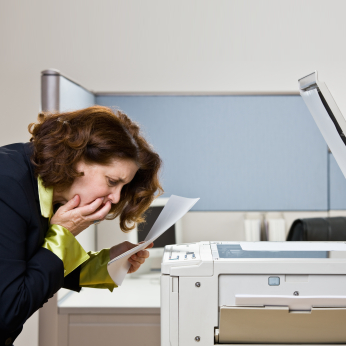
There’s a blog post making the rounds from a German PhD student who discovered that some photocopiers can spontaneously change the numbers on printed documents. He’d photocopy a page with a column of numbers, but the resulting copy had different numbers. It’s magic!
To be clear, we’re not talking about text that was just fuzzy or hard to read. The copier actively changed the document. It was swapping one number for another.
This also wasn’t an OCR (optical character recognition) problem, misinterpreting the text and making a wrong guess. That’s common enough. No, the machine’s built-in OCR function was disabled. All the guy wanted was a simple, straightforward photocopy. Simple, right? And yet the machine, with no warning, clearly and deliberately changed numbers on his documents.
Well, “deliberately” in the sense that the copier’s firmware was responsible for the change. Here’s a sample:
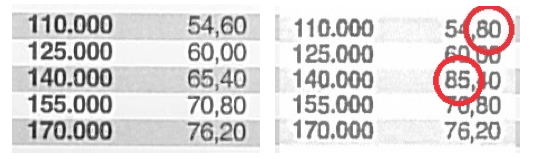
The original is on the left; the copy is on the right. On the top row, you can see how the “60” in the right-hand column of the original has been converted to an “80” on the copy. A similar transformation takes place on the third row, where “65” becomes “85.” Again, this isn’t just fuzziness caused by a poor-quality scan or print. In both cases, the digit 8 is clearly an 8, not a malformed 6. It has the characteristic “dent” in the left and right sides (typography nerds feel free to jump in here), and looks like a snowman, with two loops atop one another. Closing up the 6 with a few extra pixels wouldn’t look like that.
The copier is actually substituting numbers, drawing 8’s that aren’t there. So what’s going on?
Xerox’s firmware is too smart for its own good. Or, more accurately, the company’s programmers are too clever for their own good. Or they have too much time on their hands. Or poor management oversight. Or just a little too much extra ROM space that needed filling.
As the company admits, it’s a bug. (You think?) But it’s not just an unavoidable side effect caused by selecting the low-resolution settings. Even scanning a document at the highest possible resolution doesn’t eliminate the problem, Xerox says. In other words, there’s no way around it. You can’t trust your copied documents, period. But we’ve got a fix coming.
What they don’t say is that it’s a bug caused by poor decision-making, not just flawed code. In an effort to make copies that look nice and clean, Xerox machines try to sharpen up recognizable characters. In other words, they’re doing OCR even when you tell them specifically not to. In direct contradiction of the user’s expressed wishes (e.g., manually turning off the OCR feature), the copier does it anyway. And screws it up. And leaves no trace of its treachery.
Imagine photocopying a contract for someone to sign. It comes back with a signature, all nice and legal, but the numbers are wrong and you just got cheated out of $20,000. Are you going to suspect the photocopier – probably not – or are you going to chew out the assistant who obviously mistyped the contract? Try tracking down that bug. “Gee, the Word file on my computer looks right… it comes off the printer okay… I can’t figure out what happened, boss!”
In the game of office Clue, nobody suspects the programmer, in the copy room, with the firmware.
The failure here was in trying to do too much. And in ignoring user input. We’ve said it here before: never, ever ignore user input. It’s their machine, not yours. Learn to get out of the way. And always be up-front about what you are doing, so that intelligent users (or troubleshooters) can figure out what’s going on.
Xerox violated both of those rules, and then some. It (a) added a text clean-up feature before it was ready; (b) kept that feature enabled even when users expressly asked to turn it off; and (c) kept silent about what was going on. More subtly, it violated one of those strangely intangible aspects of all human/machine interfaces: it did something different from what we expect. Through years of experience, we’ve all learned that when we photocopy a document (sans OCR), we get a “dumb” copy, coffee stains and all. If the text gets too blurry to be legible, we solve it through other means, such as finding a cleaner original. But we expect the photocopier to just copy the $&@# image, not try to outsmart us and silently “improve” the document. The user didn’t ask for any improvement and isn’t expecting any. Thus, when the improvement algorithm fails, nobody thinks to look for it there. Especially because the OCR indicators are off. The copier is essentially lying, saying, “not me!”
The best user interfaces – indeed, the best products of any kind – work along that delicate balance between new features and old expectations. Music apps come with Play, Rewind, and Fast Forward buttons that are arranged as they have been for generations. Could that design be improved? Sure, but then we’d need to relearn it, and for what benefit? QWERTY keyboards are deliberately bad, but they’re also familiar and (nearly) universal. A lot of good product design includes deliberately mimicking anachronisms. No product exists in a vacuum, nor does any user. As developers, we need to put ourselves in the user’s head and understand that every product, no matter how important, is but one of thousands in that user’s life. None of them has a monopoly on the user’s attention, and few are worth learning new habits for.
Making photocopies used to be the job you gave to the new intern. Not something that requires a PhD and a major corporation to figure out.


Leave a Reply
You must be logged in to post a comment.